
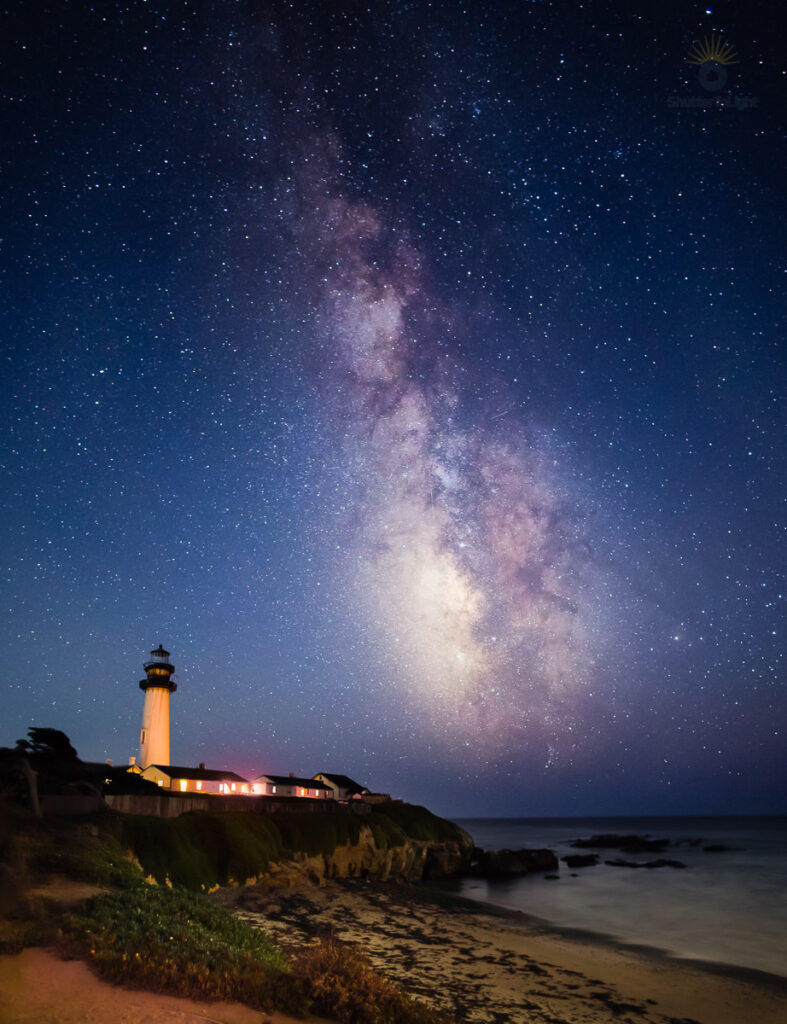
银河下的鸽子角灯塔
Pigeon Point Bajo la Vía Láctea
The lighthouse stood beneath a sky full of stars. I went to Pigeon Point with friends for a photography club workshop, hoping to photograph the Milky Way on purpose for the first time. I didn’t have great expectations, but the night—and the photograph—turned out better than I thought.
第一次有计划地拍摄银河,我和朋友们参加摄影俱乐部的活动,来到鸽子角灯塔。原本没有抱太高的期望,但那晚的天空和最后的照片都给了我惊喜。
Fui a Pigeon Point con amigos para un taller de fotografía. Era la primera vez que intentaba fotografiar la Vía Láctea de forma deliberada. No tenía grandes expectativas, pero la noche y la fotografía resultaron mejores de lo que imaginaba.
Photograph Details
Date: September 12, 2026
Location: Pigeon Point Lighthouse, California
Camera: Canon EOS R5 Mark II
Lens: Canon RF 16mm f/2.8 STM
Focal length: 16mm
Technique: A beach photograph taken before dark, blended with a Milky Way photograph
Software: ON1 Photo RAW and Adobe Lightroom
Theme: Night sky and coastal landscape
Pigeon Point Beneath the Milky Way
We were lucky: the sky stayed clear for most of the workshop. We weren’t the only photographers who had come for it, though. Tripods were packed along the viewpoint, and nearby light pollution added another challenge.
Before it got dark, I photographed the beach and coastline. Later, I made the Milky Way exposure. Blending those photographs let me keep some detail in the foreground while showing the stars above the lighthouse. It also meant finding a balance in the edit: I wanted the beach to be visible, but I still wanted the scene to feel like night.
I used ON1’s Perfect Eraser to remove a few distracting tripods near the edge of the frame. I also worked on the color where the nearby lights had left a reddish cast. In Lightroom, I added contrast to bring out the Milky Way, then applied sharpening and noise reduction. I went back and forth on how far to take those adjustments. I hope I haven’t pushed them too much.
This was my first deliberate attempt at a Milky Way photograph, and it was a fun night with friends regardless of the result. Seeing the finished image was a pleasant surprise. The lighthouse gives the sky a sense of place, while the beach and ocean remind me what it felt like to stand there and look up.
Light Notes
- Mostly clear skies gave us a chance to photograph the Milky Way.
- Nearby light pollution added color around the horizon and buildings.
- The foreground came from a photograph taken before dark.
- The finished blend keeps the coastline visible while preserving a nighttime mood.
What I Like
- The Milky Way rising above the lighthouse.
- The warm buildings against the cool sky.
- The curve of the beach leading into the frame.
- The memory of trying something new with friends.
What I’d Improve
- Find a position with fewer tripods near the edge of the frame.
- Compare this edit with a slightly softer treatment of the Milky Way.
Post-Processing Notes
- Blended the earlier beach photograph with the Milky Way photograph.
- Removed distracting tripods with ON1 Perfect Eraser.
- Reduced the reddish cast from nearby lights.
- Adjusted contrast, sharpening, and noise reduction in Lightroom.
- Brightened the foreground enough to reveal the beach and plants, then eased it back to keep the nighttime feel.
- The perspective correction and crop took away a fair amount of the original frame. I was glad I’d started with a 45-megapixel file: the finished photograph is still about 25 megapixels, with plenty of detail for sharing or printing.
Tags
Pigeon Point Lighthouse, Milky Way Photography, Astrophotography, California Coast, Night Photography, Coastal Landscape, Canon EOS R5 Mark II, Canon RF 16mm, ON1 Photo RAW, Adobe Lightroom